Every few months, a new AI website tool arrives promising a complete business site in under 60 seconds. The pitch lands with time-strapped founders for good reason: a layout, some copy and a set of images before the coffee goes cold is a tempting offer.
Here is the part that rarely makes the headline. The technology is genuinely impressive, and it is already changing how good websites get built. The trap is not AI itself. It is treating AI as the whole project team instead of a very capable member of it.
Used on its own, an automated builder produces a site that looks finished but behaves like a first draft. Used alongside experienced designers, developers and strategists, the same technology speeds up the slow parts of the process and leaves more time for the work that actually wins customers. The difference comes down to who is steering.
1. Where AI Genuinely Earns Its Place
Handled properly, AI is a serious advantage at several stages of a build:
- Ideation and wireframing – Dozens of layout directions can be explored in the time it once took to sketch two, which gives clients more options to react to early on.
- Content groundwork – First-draft copy, headline variations and metadata suggestions give writers a running start rather than a blank page.
- Code assistance – Repetitive scaffolding, boilerplate and test cases come together faster, so developers can spend their hours on architecture and problem-solving.
- Analysis and QA – AI can flag accessibility issues, spot unusually heavy assets and surface patterns in user behaviour far faster than a manual sweep.
Every one of those is a boost to the people doing the work. None of them replaces the judgement behind it.
2. Why a Human Still Has to Check the Work
Left unsupervised, AI output tends to share a few weaknesses that only experienced eyes catch.
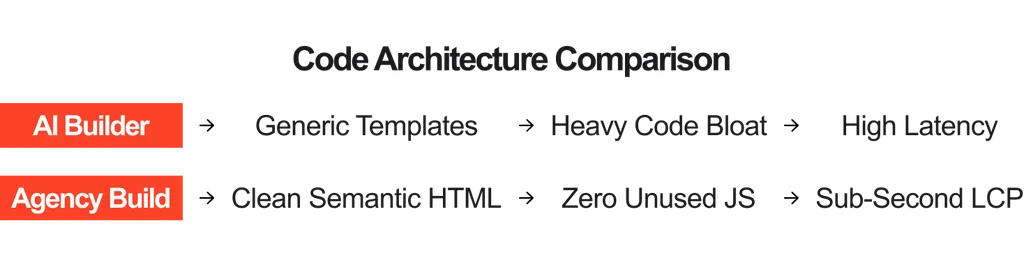
- Performance – Generated code often leans on general-purpose libraries and unused JavaScript, which can drag down Core Web Vitals: Largest Contentful Paint (LCP), Interaction to Next Paint (INP) and Cumulative Layout Shift (CLS). A developer reviewing the output can strip it back, optimise the render path and keep the site quick on mid-range phones.
- Accessibility and compliance – Standards such as WCAG 2.2 are getting stricter. Machine-generated pages regularly slip on heading order, keyboard navigation and colour contrast. A specialist audit, combining automated tools with a manual keyboard and screen reader pass, closes those gaps before they become a legal or reputational problem.
- Security – Extra functionality often arrives through third-party scripts and plugins, and every one is a potential way in. Someone has to vet what goes onto the page and decide what stays off it.
Think of it like a junior team member who works at lightning speed and never gets tired, but still needs a senior colleague reviewing what goes out the door.
3. Brand Voice Needs a Human Touch
AI learns from patterns, which means its default output drifts toward the average of whatever it has seen. Left alone, that can mean familiar layouts, safe buzzword-heavy headlines and stock imagery that feels like everyone else’s.
That is where strategists and designers add the layer that sets a business apart: a real understanding of the audience, their doubts and what makes them say yes. AI can propose ten headline directions in a minute. A person who knows the customer chooses the one that sounds like the brand, then sharpens it. The speed comes from the tool, and the character comes from the team.
4. Building for Growth, Not Just Launch
A site’s real test comes six, twelve or twenty-four months after launch, when the business needs more from it. That might mean a CRM or ERP integration through custom APIs, a secure client portal, multi-currency checkout or multi-language routing.
Closed, all-in-one AI builders tend to hit a wall here. Database structures are locked, custom functions are not possible and the site is tied to the vendor’s hosting. Outgrowing the platform often means rebuilding from scratch.
AI-assisted development on an open, well-engineered foundation avoids that problem. The site belongs to the business, can move between hosts and can keep evolving, while AI helps the team ship each new feature faster.
5. The Best of Both: A Practical Blueprint
For businesses weighing up how to use AI on a web project, a sensible approach looks something like this:
- Let AI accelerate the early stages – Concepts, wireframes, draft copy and code scaffolding.
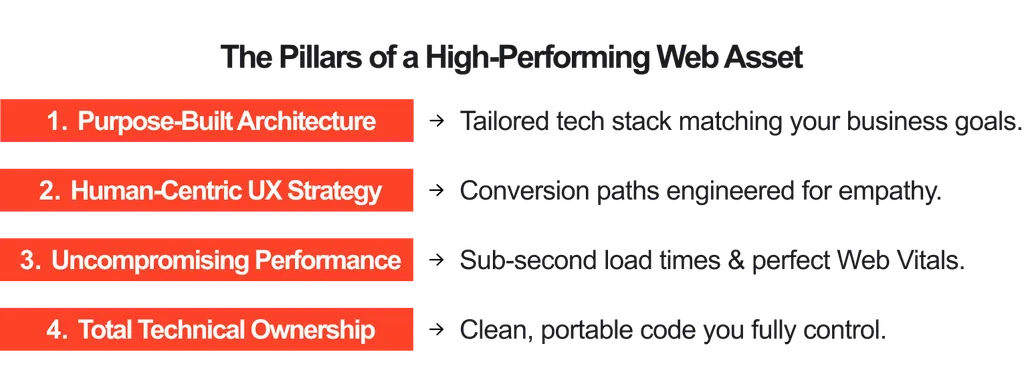
- Keep experienced professionals in charge of the decisions – Structure, brand, performance, accessibility and security.
- Review everything before it goes live – Code quality, Core Web Vitals, WCAG 2.2 compliance and third-party scripts.
- Build on open, scalable architecture – So the site can grow, integrate and move without a rebuild.
For some businesses, the right fit is an agile, high-impact package site designed for fast market entry. For others, it is a bespoke custom platform engineered to power enterprise operations. In both cases, AI works best as an assistant inside a process led by people who know what a high-performing site looks like.
Conclusion
A website is often the first real conversation a prospect has with a brand, and it deserves more than a one-minute build. AI makes that build faster, sharper and more creative when experienced professionals guide it, check it and take responsibility for the result. Used that way, it is one of the best tools a web team has ever had.
👉 Ready to build a resilient, high-converting digital presence? Talk to the strategic engineering team at Juicy Media Group.